AxCrypt2.1.1494
Publisher Description
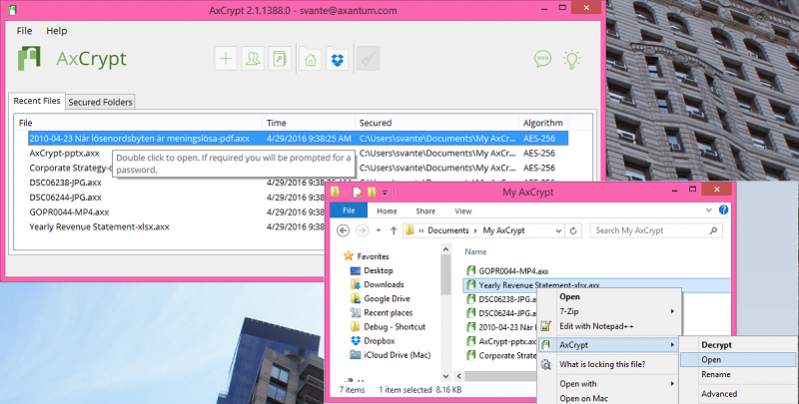
Password protection for files using strong encryption for Windows Vista or later using the AES algorithm with 256-bit or 128-bit keys.
It combines strong symmetric encryption with compression and double-click editing/viewing.
Encrypted files have a '.AXX' extension added to their names, and are shown with a new icon.
To encrypt a file, right-click it in Windows Explorer and select 'AxCrypt | Encrypt'.
To edit or view an encrypted file - just double-click it.
To decrypt, right-click and select 'AxCrypt | Decrypt' instead.
No configuration is necessary. Run the installer, and AxCrypt is ready to use.
English, French, Spanish or Swedish will be used for messages and dialogues depending on the language of the system. Documentation and installation scripts are in English.
UNIQUE FEATURES
The following are features that really set it apart from other file encryption tools, commercial as well as free:
- Double-click to edit/view with any application, with automatic re-encryption when done.
- Integrated shredder.
- 4 languages in one executable distribution.
- No options or user interface - easy to install and use.
- Absolutely no configuration needed - just use it.
- Secure memory handling - no keys or data in the paging file
- Open source under GNU GPL.
About AxCrypt
This Encryption Tools program is available in English, Dutch, French, German, Italian, Korean, Portuguese, Spanish, Swedish. It was last updated on 29 September, 2026. AxCrypt is compatible with the following operating systems: Windows.
The company that develops AxCrypt is AxCrypt AB. The latest version released by its developer is 2.1.1494. This version was rated by 7 users of our site and has an average rating of 3.6.
The download we have available for AxCrypt has a file size of 5.2 MB. Just click the green Download button above to start the downloading process. The program is listed on our website since 2017-04-20 and was downloaded 380 times. We have already checked if the download link is safe, however for your own protection we recommend that you scan the downloaded software with your antivirus. Your antivirus may detect the AxCrypt as malware if the download link is broken.
How to install AxCrypt on your Windows device:
- Click on the Download button on our website. This will start the download from the website of the developer.
- Once the AxCrypt is downloaded click on it to start the setup process (assuming you are on a desktop computer).
- When the installation is finished you should be able to see and run the program.
Program Details
General
System requirements
Download information
Pricing
Version History
version 2.1.1494
posted on 2017-04-20
Minor upgrade with bugfixes and enhancements,
version 2.1.1481
posted on 2016-10-31
Major upgrade to version 2.x from version 1.x
version 1.6.2.3
posted on 2006-02-26
Bug fixes and improvements - see the release notes and change log for details.
